Khi chạy debug mode 64 bit với các dll 64bit sẽ có thể gặp lỗi BadImageException.
Nguyên nhân là do IIS Express chưa được chỉnh chạy theo chế độ 64 bit.
Để khắc phục vào Tools -> Options -> Project and Solutions -> Web Projects -> Use the 64 bit version of IIS Express
Sunday, September 24, 2017

Thursday, August 17, 2017
Lưu ý khi kết nối C# Oracle
Khi kết nối Oracle dùng C#, nếu dùng ODP.NET để kết nối thì phải lưu ý download đúng bộ dll ứng với phiên bản Oracle.
Nếu dùng Oracle 11g thì cần download đúng bộ dành cho 11g tại
http://www.oracle.com/technetwork/database/windows/downloads/index-090165.html (64bit)
http://www.oracle.com/technetwork/database/windows/downloads/utilsoft-087491.html(32bit)
Nếu dùng Oracle 11g thì cần download đúng bộ dành cho 11g tại
http://www.oracle.com/technetwork/database/windows/downloads/index-090165.html (64bit)
http://www.oracle.com/technetwork/database/windows/downloads/utilsoft-087491.html(32bit)
Monday, June 26, 2017
Cách add thư viện jar vào Android Studio
Sau đây là các bước để add 1 thư việc jar vào Android Studio.


Bước 1: Chọn Project Files
Bước 2: Click phải vào libs, chọn "Show in Explorer" để mở thư mục này trên Windows Explorer
Bước 3: Copy file jar bỏ vào thư mục libs
Bước 4: Refesh lại thư mục libs trong Android Studio, click chuột phải vào thư việc jar, chọn "Add as Library"
Sunday, June 18, 2017
Xử lý lỗi Exception in thread "main" java.lang.NullPointerException khi chạy gen stub cho ksoap2
Khi chạy lệnh java -cp ksoap2-generating-stub-0.1-SNAPSHOT-jar-with-dependencies.jar;"%JAVA_HOME%\lib\tools.jar" ksoap2.generator.Wsdl2Android -w "http://localhost:8080/Ws2Ksoap/services/HelloWorld?wsdl" -g .\generated để tạo các file interface cho ksoap 2 mà bị lỗi Exception in thread "main" java.lang.NullPointerException thì cách xử lý như sau:
Thay vì gõ java, cần gõ full đường dẫn đến file java.exe của JDK, vd:
"C:\Program Files (x86)\Java\jdk1.8.0_131\bin\java.exe" -cp ksoap2-generating-stub-0.1-SNAPSHOT-jar-with-dependencies.jar;"%JAVA_HOME%\lib\tools.jar" ksoap2.generator.Wsdl2Android -w "http://localhost:8080/Ws2Ksoap/services/HelloWorld?wsdl" -g .\generated
Thay vì gõ java, cần gõ full đường dẫn đến file java.exe của JDK, vd:
"C:\Program Files (x86)\Java\jdk1.8.0_131\bin\java.exe" -cp ksoap2-generating-stub-0.1-SNAPSHOT-jar-with-dependencies.jar;"%JAVA_HOME%\lib\tools.jar" ksoap2.generator.Wsdl2Android -w "http://localhost:8080/Ws2Ksoap/services/HelloWorld?wsdl" -g .\generated
Wednesday, March 01, 2017
Xử lý khi Oracle password bị expired
Khi gặp lỗi mật khẩu bị expire, có thể tham khảo cách làm dưới
https://hecpv.wordpress.com/2014/10/16/how-to-solve-ora-28001-the-password-has-expired/
The other day I was happily opening SQL Developer when I found this horrible thing.
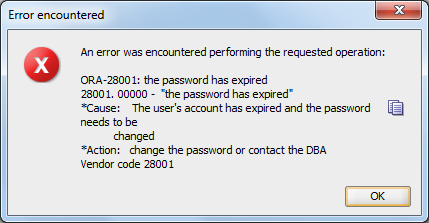
Here is how to solve it.
- Connect as sysdba to the database.
C:\Users\Siry>sqlplus / as sysdba
- Run the query to set the password’s life time to unlimited.
SQL> ALTER PROFILE DEFAULT LIMIT PASSWORD_LIFE_TIME UNLIMITED;
Profile altered.
- Set a password for the locked user.
SQL> ALTER USER user_name IDENTIFIED BY password;
User altered.
- Unlock the user account.
SQL> ALTER USER user_name ACCOUNT UNLOCK;
User altered.
- Make sure your user is not locked anymore.
SQL> SELECT USERNAME,ACCOUNT_STATUS FROM DBA_USERS;
USERNAME ACCOUNT_STATUS
------------------------------ --------------------------------
HR                             OPEN
ANONYMOUS                      OPEN
APEX_040000                    LOCKED
FLOWS_FILES                    LOCKED
XDB                            EXPIRED & LOCKED
CTXSYS                         EXPIRED & LOCKED
MDSYS                          EXPIRED & LOCKED
SYSTEM                         OPEN
SYS                            OPEN
user_name                      OPEN
SIRY                           OPEN

USERNAME ACCOUNT_STATUS
------------------------------ --------------------------------
APEX_PUBLIC_USER               LOCKED
XS$NULL                        EXPIRED & LOCKED
OUTLN                          EXPIRED & LOCKED

15 rows selected.
Remember that all the text in Italics represents variables and should be replaced with your own values.
Please note that this may NOT be the best option for you specially if you are not using your database only for development/testing which is my case. I do not recommend to do this in a production environment.
Thursday, February 09, 2017
Xử lý sự cố kết nối vào Oracle bị lâu
Nếu có 1 ngày sử dụng Sql Developer hoặc kết nối software client vào Oracle mất rất lâu mới được thì phần lớn là do file listerner.log quá lớn ~ 4GB
Cách xử lý là stop service listener. Vào thư mục cài đặt Oracle, tìm kiếm file listener.log. Xóa đi hoặc đổi tên. Sau đó start lại là xong.
Cách xử lý này được tham khảo theo bài viết bên dưới
https://vjdba.wordpress.com/2013/09/24/93/
Cách xử lý là stop service listener. Vào thư mục cài đặt Oracle, tìm kiếm file listener.log. Xóa đi hoặc đổi tên. Sau đó start lại là xong.
Cách xử lý này được tham khảo theo bài viết bên dưới
https://vjdba.wordpress.com/2013/09/24/93/
Subscribe to:
Comments (Atom)